Must have FREE tools for your PC
Senin, 23 Desember 2013
0
komentar
People always look for the best media player, the best photo viewer or the best photo editor on web. Well, there's no harm in that. But how many of us really care about resources on our machines? We keep on packing more & more songs, videos, photos & needless to mention games apart from other data (this other could be your office documents, study material & what not) but there comes a time when things start to fall short. Disk goes full, start-up time increases, system freezes & unexpected happens. Bottom-line, we all need to look for some sort of application tools that will make our lives easy. Of course my blog talks only about FREE & FULLY FUNCTIONAL software, so today I present a list of 5 such free tools to tune-up your system & improve its performance.




1. WinDirStat - A tool from Open Source project, WinDirStat allows you to graphically sort folders & files on your disk partitions. If you want to check what folders or files are filling up your disk, WinDirStat will let you do that. At just 630 KB installation file, this one is ultra light on your resources & is quite efficient.

2. Cobain Backup 11 - Hard Drives are prone to failures or crashes unless its a flash media or a Solid State Device. So, its a good idea to back up your critical data. While its super easy to manually copy data to removable media, nothing can beat Cobian's automation. It allows you to schedule full, incremental or differential backups. I personally use it to backup my mammoth collection of music & videos. Give it a try, invest a few minutes to set up your backups & rest assure. Advanced users can even backup complete system.

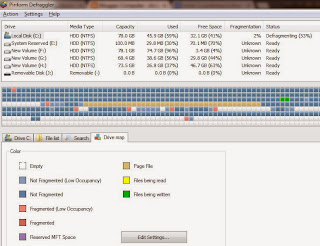
3. Piriform Defraggler - Windows built-in defragmentation is just OK. Over time files keep on moving to & from system i.e. we add new data & remove some. We install new applications & uninstall what is not needed. It leaves a lot of inconsistency on disk. Files get scattered over disk & access (I/O) time increases. Thus we need some sort of defragmentation tool to move all files to one place & free space to another. Defraggler from Piriform (developers of most talked about CCLEANER) does the job for us. Use it to analyse your disks & then defragment if needed.

4. Auslogics Duplicate File Finder - Now this is indeed the most common mistake we all do on our machines. Redundant data is such a waste of resources (unless its done knowingly). Getting rid of duplicate files is one good way to free up the clutter & improve performance. Auslogics Duplicate File Finder will make it easy for you.

5. Auslogics Registry Defrag - System Registry is a place that faces most of the addition/removal. New applications write to it, uninstalling something takes values off it. So after sometime, it becomes fragmented just like disk. So it also needs some defragmentation. Auslogics Registry Defrag optimizes your Registry & allows to improve performance. Use it periodically.

All the tools mentioned above have been tested (I still use them all) on my Dell inspiron 1525 with Windows 7 Professional. Its a good idea to take backup of registry before doing any modifications to it. Use ccleaner for this.

Baca Selengkapnya ....


.png)
